Slido Pricing Explained: Free Plan Limits, One-Time vs Annual Plans

You want to use Slido, but you're not sure how much you can do for free or what a paid plan will cost.
The short answer: Slido is free for up to 100 participants per event. Above that, you pay per event or per year. There's no monthly billing. Slido shows prices in your local currency. Third-party pricing sites report US one-time plans starting at roughly $60–80 per event.
This article covers the one-time and annual plans, what the free plan includes, and how many events a year make an annual plan worth it.
Slido pricing plans: one-time vs annual
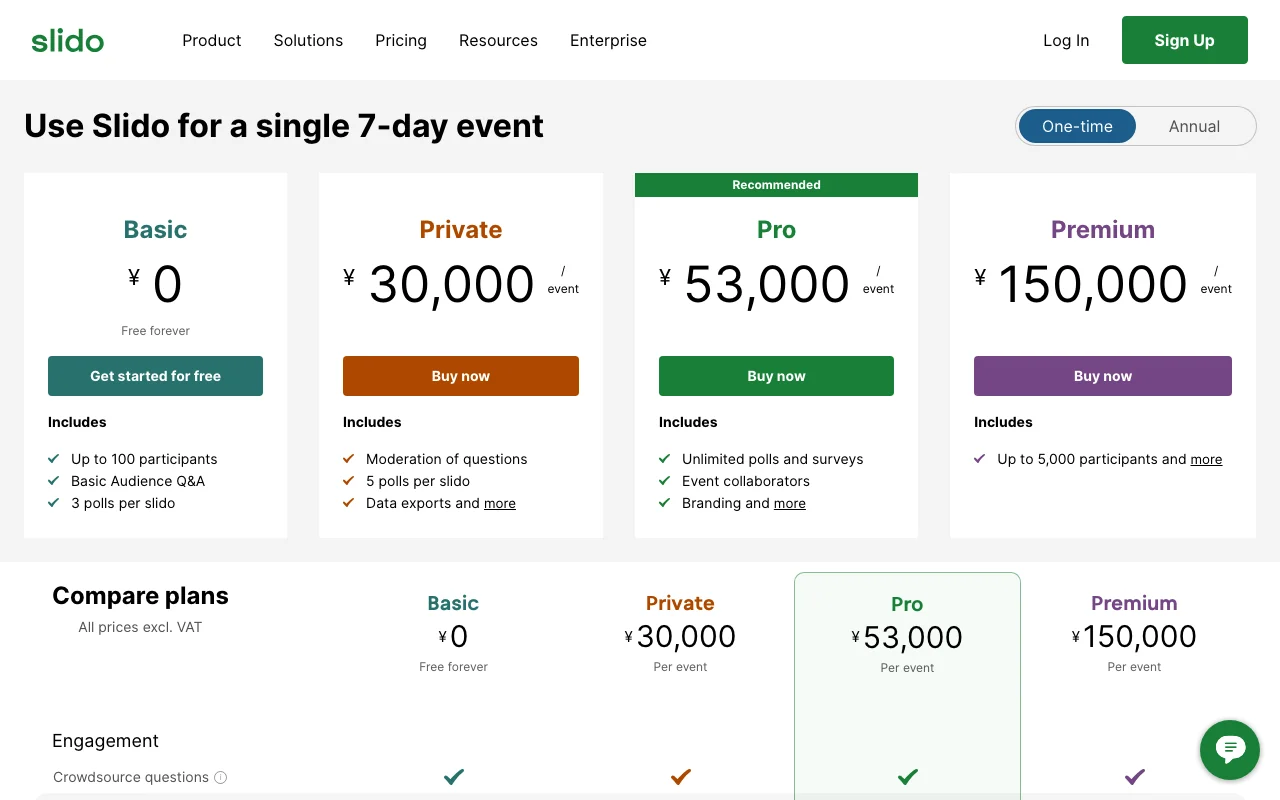
Slido's one-time plans as shown to a visitor from Japan (prices in JPY), November 23, 2026
Slido has two ways to pay: a one-time plan for a single event, or an annual plan you can use for a year. There's no monthly plan, so you pick one based on how often you run events. The pricing page shows prices in your local currency, so the amounts depend on where you are. The table below shows the plans as they appear from Japan.
| Plan | Billing | Price in Japan (excl. tax) | Participants per event | What it adds |
|---|---|---|---|---|
| Basic (free plan)Free | Free forever | Free | 100 | Q&A, 3 polls, 1 quiz |
| Private | One-time | ¥30,000 per event | 1,000 | Question moderation, exports |
| Pro | One-time | ¥53,000 per event | 1,000 | Unlimited polls and surveys |
| Premium | One-time | ¥150,000 per event | 5,000 | Capacity for large events |
| Internal | Annual | ¥135,000 per year | 1,000 | Question moderation, exports |
| Corporate | Annual | ¥180,000 per year | 1,000 | Unlimited polls, team management |
| Enterprise | Annual | ¥360,000 per year | 5,000 | Single sign-on (SSO) with company accounts |
Plans and prices: Slido's official pricing page as shown in Japan (checked November 23, 2026). Participant limits apply per event (per slido)
In other countries the amounts are different. Third-party pricing sites report US one-time plans at roughly $60–80 per event for the entry tier and $700–1,000 for the top tier. Before you budget, open slido.com/pricing and check the prices shown for your country.
A one-time plan covers one event for up to 7 days, so a two-day conference needs only one plan. Annual plans don't renew automatically. Slido emails you 30 days before the plan expires.
You pay by credit card. Paying by invoice (bank transfer) is only available on the annual Enterprise plan. You can cancel or change a one-time plan any time before the event and get a refund, and annual plans come with a 30-day money-back guarantee. If your company needs an invoice to approve the purchase, check this before you commit.
Slido free plan: how many participants, and what's included

Slido's free plan (Basic) works for up to 100 participants per event. Slido calls each event a "slido". The free plan includes basic Q&A: people can ask questions anonymously and upvote each other's questions. You can also create up to 3 polls and 1 quiz per slido. There's no time limit, so for a team meeting or a 50-person seminar, the free plan is usually enough.
Note that the 100 isn't the number of people online at the same time. It's the total number of devices that join the event. Even with 90 attendees, you can go over 100 if some people join from both their phone and their laptop. If you expect close to 100 people, plan for a paid plan just in case.
On the free plan, you can't:
- Let in a 101st participant
- Review questions before they appear (moderation)
- Export questions and poll results, for example to Excel
- Create a 4th poll
The missing moderation is the one people tend to overlook. On the free plan, every question is visible to participants as soon as it's sent. If executives are taking questions at an internal meeting and you want to screen harsh ones first, consider a paid plan.
To use the free plan, create an account, create an event, and show the event code or QR code on screen. Participants enter the code at slido.com or scan the QR code, and they can send questions without installing an app.
If people will join from other countries, check one more thing. According to Slido's FAQ, Slido is blocked in Russia and Belarus and works poorly in mainland China. If your audience includes people there, plan for a different tool.
Slido free vs paid: when a paid plan is worth it

A paid plan raises the limit to 1,000 participants (5,000 on the top tier) and adds moderation and exports. From the Pro tier up, polls and surveys are unlimited.
A paid plan is worth it for three kinds of events. First, all-hands meetings and talks with more than 100 participants. Second, events where you want to check questions before they go on screen, such as leadership Q&As or shareholder briefings. Third, events where you need to keep the questions and answers and share them afterwards. If none of these apply, the free plan will rarely get in your way.
Some things stay the same on a paid plan. Participants still ask from a browser without an app, and they can still ask anonymously. So base your decision on three things: headcount, moderation and exports.
If your company already pays for Webex, you can use Slido inside Webex meetings at no extra cost. A Webex administrator has to turn it on, so ask your IT team first.
Slido for a single event: one-time price vs annual plan

For events over 100 people, whether a one-time plan or an annual plan is cheaper depends on how many events you run a year. Here is the math with the prices shown in Japan, comparing the one-time Private plan (¥30,000) with the annual Internal plan (¥135,000).
| Events per year | Total on one-time plans (Private) | Compared with the annual plan (Internal) |
|---|---|---|
| 1 | ¥30,000 | One-time is ¥105,000 cheaper |
| 2 | ¥60,000 | One-time is ¥75,000 cheaper |
| 3 | ¥90,000 | One-time is ¥45,000 cheaper |
| 4 | ¥120,000 | One-time is ¥15,000 cheaper |
| 5Break-even | ¥150,000 | Annual is ¥15,000 cheaper |
| 6 | ¥180,000 | Annual is ¥45,000 cheaper |
Calculated from Slido's official prices as shown in Japan (excl. tax, checked November 23, 2026)
With these prices, the annual Internal plan is cheaper once you run 5 or more events a year. Up to 4 events, paying per event wastes nothing. To find the break-even point in your country, divide the annual price by the one-time price you see. In Japan, 135,000 ÷ 30,000 = 4.5, so the 5th event tips the balance. If you're not sure how many events you'll run, start with one-time plans. When you can see 5 or more events coming in the next 12 months, switch to an annual plan.
If you teach at a school or university, also look at Slido's education plans. In Japan, the Teacher plan costs ¥12,000 a year (excl. tax) for up to 1,000 participants, and it includes moderation and exports. It's only for teachers at schools and universities. Corporate trainers and independent speakers need the regular plans.
Cheaper Slido alternatives: free and pay-per-event Q&A tools
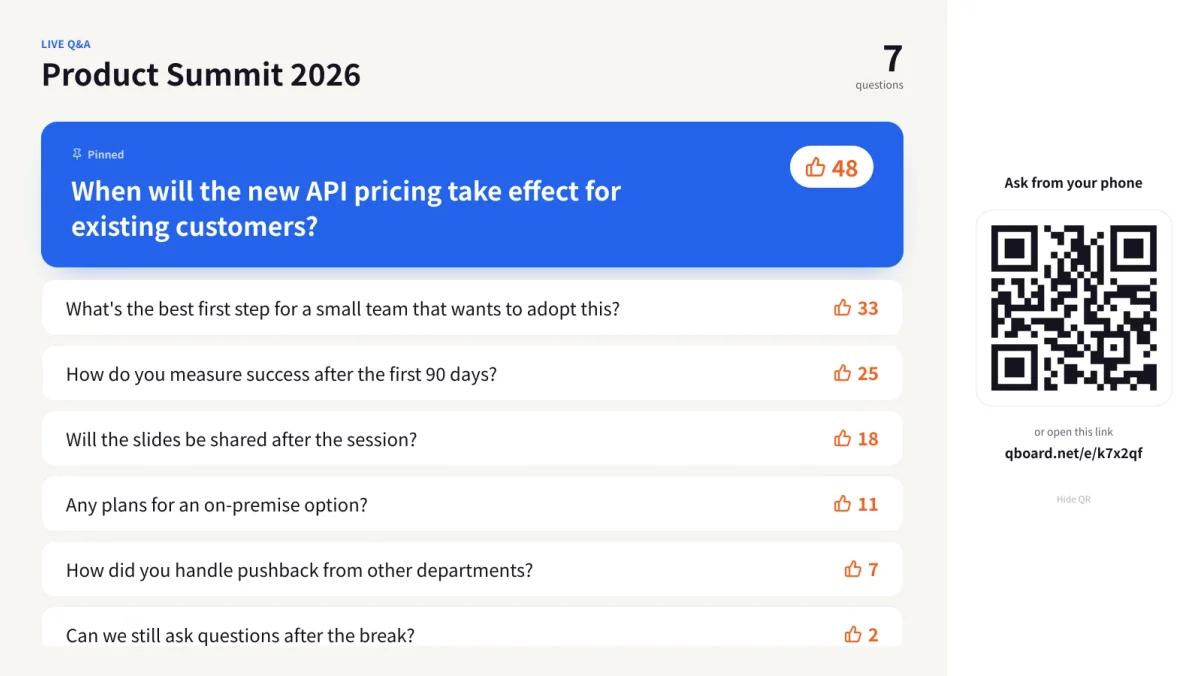
Screen: QBoard's projector view
If you run events over 100 people only two or three times a year, paying for a Slido plan each time can feel heavy. Other Q&A tools let you pay per event or by the month, or use them free within limits.
QBoard, the tool behind this site, costs $19 per event for up to 1,000 participants, with no monthly fee. Mentimeter's free plan allows 50 participants a month, plus one session a month with unlimited participants. Vevox is free for up to 100 participants, and its one-time event plan costs $195 for 7 days and up to 1,500 participants, with Q&A moderation included. Pigeonhole Live is free for 100 participants. Its Presenter plan costs $13 billed monthly for up to 250 participants with moderated Q&A, and you can cancel anytime. Pigeonhole Live no longer offers one-time plans.
To be clear about QBoard: for a single event of 150–250 people, a month of Pigeonhole Live's Presenter plan ($13, cancelled afterwards) costs less than QBoard's $19. What QBoard offers is that there's nothing to cancel, each event takes up to 1,000 people, and no names are collected, so not even you can see who asked. The screens come in 16 languages, and it's very simple to run. QBoard has no pre-approval, polls or quizzes. You hide or delete questions after they're posted.
All of these tools handle questions and upvotes, but they differ on polls and quizzes, moderation before display, and how anonymity works. To collect questions quickly, QBoard fits. For polls and quizzes, try Mentimeter or Vevox. For moderation on a small budget, look at Vevox's one-time plan or Pigeonhole Live's monthly plan. We compare these tools side by side in this article:
Summary: choose Slido's free, one-time or annual plan by headcount and frequency

For events of up to 100 participants, start with Slido's free plan. Above 100, you need a one-time plan for each event. If you run several such events a year, compare it with the annual plan: with the prices shown in Japan, the annual plan wins from the 5th event. Check slido.com/pricing for your country before you budget.
If paying for a Slido plan for a few events a year feels like too much, compare QBoard: $19 per event for up to 1,000 participants. You can try it free first.
Show the QR code on screen, and participants ask questions anonymously from their phones. You pay only for the events you run, with no annual contract.
Try it freeFree trial: 30 participants and 60 minutes, all features, as many times as you like. No app or sign-up for participants