What Is an All-Hands Meeting? Purpose, Sample Agenda, and How to Make It Worthwhile

Your monthly all-hands has turned into an hour of listening to each department's numbers, one after another.
An all-hands is where everyone gets on the same page about where the company is and what comes next. So keep the reports short, and give the time to questions and conversation instead.
This article covers what an all-hands is for, how often to hold one, a sample 60-minute agenda, and how to run it so no one calls it a waste of time.
What Is an All-Hands Meeting? All-Hands vs Town Hall and Other Meetings

An all-hands meeting is a regular meeting where everyone, from the CEO and executives to front-line employees, gets together to hear the company's direction, its numbers and what each department is working on. Many companies hold it monthly or quarterly, on the same day and at the same time.
Companies call it different things: all-hands, company meeting, all-staff meeting or company-wide meeting. “All hands” simply means “everyone,” so whatever you call it, the meeting is the same.
What's confusing is how it differs from an annual company meeting or a town hall meeting. All of them bring the whole company together, but they differ in how often they happen and what most of the time is spent on.
| Meeting type | How often and how long | Main focus |
|---|---|---|
| All-hands meetingThis article | Monthly or quarterly · 30–60 min | Sharing direction, numbers and department updates |
| Annual company meeting | Once a year · Half a day to a full day | Looking back on the year, awards, social event |
| Town hall meeting | Quarterly or every six months · 60–90 min | Questions and dialogue between leadership and employees |
| Department meeting | Weekly or monthly · 30–60 min | Progress and issues within the department |
| Morning briefing | Daily or weekly · 5–15 min | The day's announcements and greetings |
An annual company meeting is a once-a-year event: you rent a venue and plan it with awards and a social event. A meeting built around leadership answering employees' questions on the spot is called a town hall meeting. An all-hands, by contrast, is easiest to think of as a fixed monthly slot where everyone checks together where the company stands. Department meetings and morning briefings mostly cover what's happening within a team, and rarely get into company-wide direction or numbers.
All-Hands Meeting Purpose and How Often to Hold One

If it's only numbers and announcements, you could post them in chat or send a company-wide email. But three things are hard to get across in writing, and they're the reasons to hold an all-hands.
First, everyone can see where the whole company stands, using the same numbers. Front-line employees may check their own department's numbers every day, yet rarely get a chance to see how close the whole company is to this month's target. When the CEO shows the numbers and says, “That's why we're focusing here next month,” people can connect the company's direction to their daily work.
Second, people learn what other departments did this month. It's not unusual for an engineer to first hear about a new deal from sales at the all-hands. If you know what's happening in other departments, you can get ready for work you're likely to be asked for next month. Third is the sense of being part of the company. The more a company is spread across offices or working remotely, the more it helps to hear the same message at the same time, even once a month.
Most companies hold an all-hands once a month or once a quarter. If you have around 30 employees and the business changes fast, a monthly meeting, or even a short weekly one, won't be a burden. At a company of around 300 with many offices, just lining up everyone's schedules is hard work. Consider a quarterly all-hands, and move the monthly updates to the company newsletter or chat.
Aim for 30–60 minutes per meeting. Go past 60 minutes, and people have lost focus by the time you reach the later department updates and the Q&A. Hold it in the first week of the month, once the previous month's numbers are final, so you have complete figures to review. Picking a day that doesn't clash with month-end closing also gets more people to attend.
All-Hands Meeting Agenda: A Sample 60-Minute Agenda

For a 60-minute all-hands, you can build the agenda like this. The example assumes a company of about 100 employees with four departments.
| Agenda item | Time and speaker |
|---|---|
| 1. Message from leadership: direction for the month | 10 min · CEO |
| 2. Numbers review (gap to target, and why) | 10 min · Finance or the executive in charge |
| 3. Department updates (3–4 min each) | 15 min · Department heads |
| 4. Recognition and new-hire introductions | 5 min · HR and the new hires |
| 5. Q&A | 15 min · CEO and executives (the moderator reads out the questions) |
| 6. Wrap-up and asks for the coming month | 5 min · Moderator |
Leadership's message goes first so employees can hear the numbers and department updates in light of the company's direction. For the numbers review, ask the presenter not to read out tables of sales and orders, but to cover only the gap to target and the reasons for it. Send the detailed tables out the day before, and that's enough.
For department updates, have every department use the same three lines: “What we did this month,” “What we'll do next month,” and “Where we're stuck.” That keeps them from running long. “Where we're stuck” is especially useful: other departments listening may be able to help, so it gets people talking after the meeting.
In this example, 35 minutes go to reporting and 20 minutes to segments where employees take center stage, such as recognition and Q&A. Treat the 15 minutes of Q&A as protected, even if earlier items run over. When reports run long, Q&A is the first thing to get cut. Tell the moderator in advance: “However far behind we are, move to Q&A when there are 20 minutes left.” Then there's no hesitation on the day.
In months when you only have 30 minutes, give 5 minutes to direction and 5 to numbers, and rotate department updates so only one department presents. That still leaves 10 minutes for Q&A and 5 for the wrap-up. The shorter the meeting, the more important it is to cut the reports and keep the question time.
If the CEO tries to answer every question alone, 15 minutes won't be enough. Have the moderator route each question: reviews and ways of working to the HR executive, new products to the head of that business. That way you can answer many more questions, even in 15 minutes.
How to Run and Prepare an All-Hands Meeting

Once you've set the preparation routine for a monthly all-hands, you just repeat the same steps. Here's what the person in charge needs to do, starting a week before.
- One week before: share the agenda and who's presentingSend the list of speakers and time slots to the executives and department heads who'll present. If there's a rotating team spotlight, give that team a heads-up too.
- Three days before: slide deadlineAsk for one or two slides per department, all on the same template. When the format matches, the audience knows where to look.
- By the day before: share the slides and collect questionsSend the slides to everyone, and collect “What would you like to ask leadership this month?” through an anonymous form or similar. Pass the questions to the CEO ahead of time.
- On the day: run it with a moderator and a timekeeperThe moderator introduces each speaker, and the timekeeper signals when one minute is left. If people are joining online, it helps to have someone watching the chat.
- By the next day: share a summaryWrite a short summary of decisions, questions and answers, and action items for next month, and send it to everyone with the recording link.
Instead of having the same person moderate every month, you can rotate the role among departments. When employees from different teams stand at the front, the meeting no longer looks like it belongs only to leadership and the organizing team.
The summary doesn't need to be long minutes. Fit it on one page under three headings: “Decisions,” “Questions and answers,” and “Action items before next month (owner and deadline).” Busy employees will actually read it. At the start of the next meeting, spend one minute on how the action items went, and decisions won't quietly fade away.
Everyday work clothes are fine. Just let people know in advance when you're inviting clients or taking photos for the company newsletter.
Why All-Hands Meetings Feel Like a Waste of Time, and How to Fix Them
It's the all-hands at the start of the month. Department heads read through their slides one by one. The moderator asks, “Any questions?” No one raises a hand, and the meeting closes with “See you next month.” After a few months like that, employees start saying it makes no difference whether you show up. Here's what's going on in those meetings:
- Presenters read out what's already on the slides
- One number after another that has nothing to do with your department
- Your manager is sitting next to you, so it's hard to ask a question
- No one knows what happened to last month's decisions
You can cut the read-aloud slides and the irrelevant numbers through how you build the agenda. Send the slides the day before, cover only the gap to target and the reasons on the day, and have departments use the three-line format. That alone makes the usually long reports much shorter.
The hard one is the third: how difficult it is to ask. The same faces every month, your own manager in the next seat: raising your hand to ask the CEO something takes courage. The more months end in silence, the less employees see the all-hands as a place where they can ask anything.
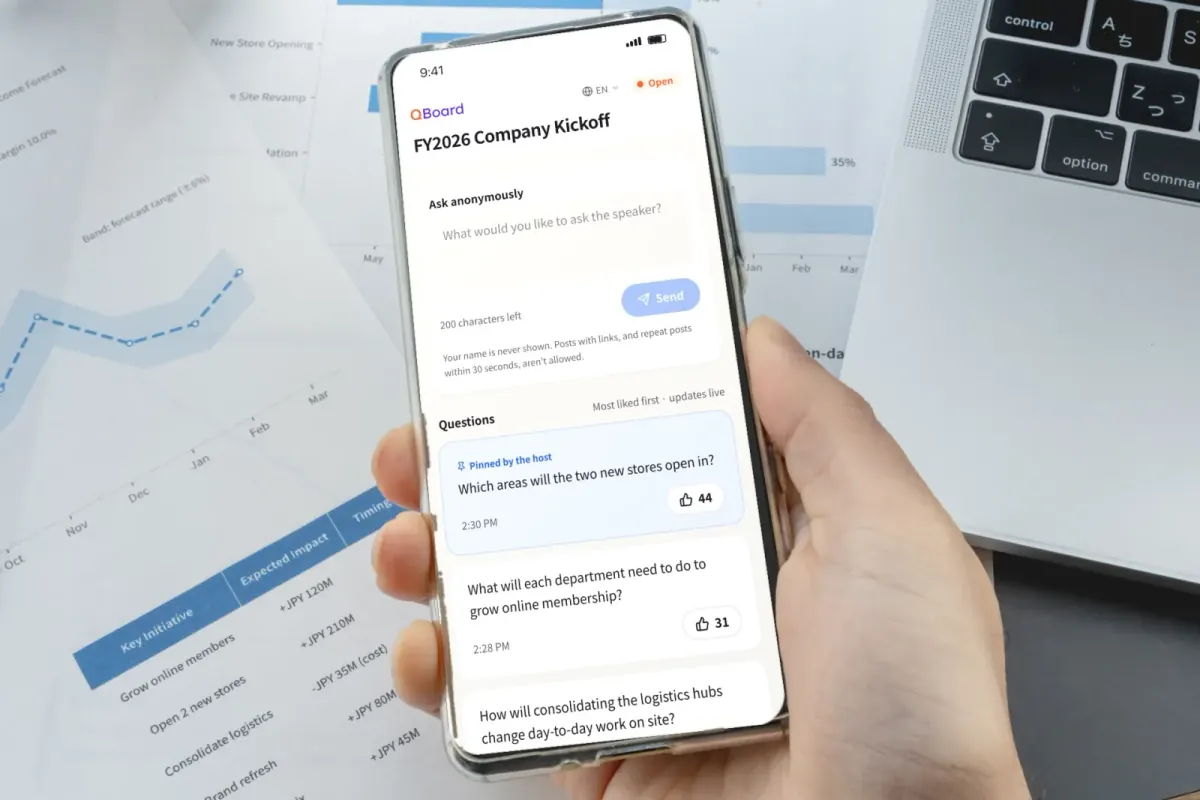
So try switching from raised hands to questions sent from phones, without names. Other employees can like the questions that come in, so the number of likes decides the order you answer them in. With QBoard, for example, show the QR code on the screen at the start of the meeting and post the link in the chat for online attendees. Questions from the meeting room and from online appear in a single list. Employees send them from their phone's browser, so there's no app to install. Names are never collected, so not even the organizers can see who asked.
Like every month, you can send questions for leadership through the QR code on the screen. Your name won't be shown, so if anything comes up while you're listening to the updates, send it right away. We'll answer the most-liked questions in the last 15 minutes.
If you make your slides in Google Slides, install the free Chrome extension “QBoard for Google Slides” on the presenting computer and paste the event URL on your Q&A slide. When the slideshow reaches that slide, the live question list appears on it, so you don't have to switch back and forth between your slides and the question screen. PowerPoint and Keynote aren't supported for now, so if you use them, switch to the QR code screen when you move to Q&A.
Have the CEO read the questions collected through the form by the day before, and on the day, answer the most-liked questions first.
QBoard costs $19 per event, for up to 1,000 people and 4 hours from when you press Start. That's plenty for a 60-minute meeting. Credits are valid for one year after purchase, so you can buy them in advance and use one each month. That said, if your company has 100 employees or fewer, some Q&A tools' free plans may be all you need, so compare tools by the number of participants and how many meetings you hold a year.
For the last problem, decisions that go nowhere, the most direct fix is to record your answers in the meeting summary. QBoard keeps the question list available after the meeting ends, so you can go through it and note in the summary which questions you answered and how. Answer the questions you ran out of time for at the start of next month's all-hands: “Here's the follow-up on last month's questions.” When employees see their question was remembered a month later, they'll keep sending questions.
All-Hands Meeting Ideas: Segments Worth Adding

With the time you free up by shortening the reports, add one segment that makes employees look up and want to listen. These segments work well in a monthly all-hands:
| Segment and time | What it looks like | Easy to keep up monthly? |
|---|---|---|
| New-hire introductions (1 min each) | Their previous job, and one thing they'd like to ask around the company | Yes, in the month they join |
| Customer feedback (3 min) | Read out one thank-you or one tough comment sent to sales or support | Yes, every month |
| Team spotlight (5 min) | Show a day in another team's work with photos | Sometimes, on a rotation |
| Small win of the month (3 min) | The person explains what worked, or read out shout-outs from colleagues | Yes, every month |
| Ask leadership (10–15 min) | The CEO answers questions collected anonymously | Best: the longer you keep it going, the more questions come in |
Customer feedback takes almost no preparation, yet it resonates even with employees in departments that never talk to customers. Read out tough feedback too, and ideas for doing better start coming from across departments. A team spotlight takes more preparation. Rotate it one team per month, and within a year every team will have had its turn at the front.
For new-hire introductions, ask each new person to share one thing they'd like to ask around the company. It makes it easy for whoever knows the answer to go talk to them after the meeting. And the longer you keep an “Ask leadership” segment going, the more employees see that it's safe to ask here, and the more questions come in each time.
You don't need to fit every segment into one meeting. Choose one regular you include every month and one you add now and then. That's about the right amount for the organizing team to keep going.
Tips for a Virtual All-Hands Meeting

For an online all-hands, the first things to get right are camera and sound. Ask presenters to use earphones with a mic or a headset. If you stream from a meeting room, test before you start that the room audio reaches online attendees clearly. Ask people who aren't speaking to mute, so background noise stays out.
Keep the channel for questions open for the whole meeting. Zoom meetings have a Q&A feature for taking questions alongside chat, and you can allow anonymous questions in the settings. However, Zoom's official help says meeting Q&A requires a Zoom Workplace Business plan or higher. If your company runs meetings on the Basic (free) or Pro plan, post the link to a browser-based Q&A tool in the chat instead.
Source: Zoom Support, “Enabling Q&A for meetings” (checked November 24, 2026)
Always record the meeting for people who can't attend. Shift workers and employees in other time zones can watch the same thing later. Send the recording link with the meeting summary so no one has to hunt for it. For step-by-step Q&A settings, see our guide to using Q&A in Zoom.
Summary: Cut the Reports and Make Time for Conversation

An all-hands meeting is a regular meeting where everyone gets on the same page about where the company is and what comes next. Leave the details to the slides, keep the reports short, and use the time you save to answer employees' questions. Do that month after month, and no one will say it makes no difference whether you show up. Record the questions you answer in the meeting summary, and pick up the ones you didn't get to the following month.
Start by writing 15 minutes of Q&A into next month's agenda before anything else. QBoard's free trial covers up to 30 participants for 60 minutes, and you can use it as many times as you like after signing up. Run through next month's 60-minute flow with your organizing team, all the way to copying the question list into the meeting summary afterward, and you'll have a feel for the real thing.
Share a QR code or link, and questions come in anonymously from the meeting room and from online. They're sorted by likes, so even with limited time, you answer what most employees want to know first.
Try it freeFree trial: up to 30 participants for 60 minutes, as many times as you like. Participants need no app and no sign-up