Lunch and Learn Questions: How to Get People Asking, Plus Example Questions

You leave time for questions at the end of your team's lunch and learn, and every time no one raises a hand. The colleague who presented ends up wrapping up awkwardly.
To get questions, set up time for people to think of a question, and a way to ask without raising a hand, before the session starts.
This article shows you how to run an internal session that gets questions, with example questions people can ask a colleague who's presenting.
Why No One Asks Questions at a Lunch and Learn

No time to think of a question, not wanting colleagues to think you don't get it, and not wanting to put the presenter on the spot. When no one asks questions at an internal session, it's usually one of these three.
Start with time. At a lunch and learn, “Any questions?” comes the moment the presenter finishes. While people are listening, they're busy just keeping up, with little room to turn what they heard into a question. At an engineering session full of jargon, by the time someone looks up an unfamiliar term, the talk may have moved on.
The second is colleagues. The people in the room are teammates, senior colleagues and managers you see every day. At an outside seminar, you'll never see the audience again. At work, it feels like people will think “They don't even know that?”, so you keep quiet. New hires and people who have just moved teams feel this most.
The third is not wanting to put the presenter on the spot. When colleagues take turns presenting, everyone knows this one made the slides on top of a busy workload. Asking about a confusing part can feel like criticizing their preparation. But if the session ends with no questions, the presenter can't tell whether the message landed, and is left feeling uneasy.
So people who stay quiet during the Q&A don't necessarily have no questions. Give them time to think and a way to ask without their name, and the questions will come.
How to Run an Internal Lunch and Learn So People Ask Questions

The trick is to start working on questions at the beginning of the session, rather than waiting for the Q&A at the end. For an internal session of about 10–30 people, these five steps work as they are.
- At the start, announce: “At the end, I'll ask each of you for one question”People listen while looking for a question, so by the end, everyone has at least one.
- Take a minute for notes at each breakPause whenever you change topics and have people write down what was unclear or caught their interest.
- Have people talk with a neighbor for a minute before you askWhen two people talk about what was hard to follow, they see they're not the only ones, and it's easier to speak up.
- Collect written questions on sticky notes or with a Q&A toolSo people can ask without raising a hand, have sticky notes ready, or a Q&A tool where they can send questions anonymously from their phones.
- Have the organizer ask the first questionWhen the organizer asks something basic first, it's easier for others to follow.
If you try just two things, make them the announcement at the start and the one-minute chat with a neighbor. With the announcement, people listen while thinking “What should I ask?” Talking in pairs, two people may find they got stuck in the same place. Then they can open with “We were just talking, and we wondered…”, which feels much easier than raising a hand alone.
If you use sticky notes, have each person write one during the note-taking time, then collect them before the end and have the organizer read them out. Make names optional, and no one has to worry about what colleagues think. A Q&A tool on people's phones saves you collecting anything, and people can like each other's questions to show they want to know too.
Instead of sticky notes, you can also hand out question cards with separate fields. With these three fields, everyone can fill in at least one, so fewer cards come back blank.
Something from today I didn't understand:
Something I want to try starting tomorrow:
Something I'd like to ask the presenter:
With about 10 people, try going around the room and asking each person for “one thing that was hard to follow” instead of a question. People who freeze at “Any questions?” find it easier to name something unclear, and the presenter's follow-up starts from there.
Have a word with the presenter beforehand, too. If they meet every question with a “Thanks for asking” first, the next person finds it easier to raise a hand. Tell them that when they're stuck, “Let me look into it and post the answer in the chat later” is a perfectly good answer, so they can relax.
Example Questions to Ask a Colleague Who's Presenting

At an internal session, the presenter is a colleague at the same company doing similar work. You can ask things you'd hesitate to ask an outside speaker, like “How would our team do this?” or “Where's that document?” That's the advantage of keeping it in-house. As the organizer, paste the four kinds of questions below on the last slide or in the chat for participants.
The most useful questions ask how to take today's talk back to tomorrow's work. The answer becomes the next action, which saves time for the person asking and for their teammates.
- If we added today's review points to our team's checklist, which item should we start with?
- If I try today's template on the proposal I'm sending next week, which page should I fix first?
Asking where materials and examples are kept is a perfectly good question at an internal session. Everyone else will be looking for them later too, so asking on the spot helps everyone.
- Where can we find today's slides and the code from the examples?
- Which version of the procedure doc you mentioned is the latest one?
It's also worth asking why the presenter chose their approach, rather than about the steps themselves. Once you know the reasoning, you can make your own call on projects where things are different.
- Is there a reason you limit review comments to three?
- Why did you put the pricing on the last page of the proposal?
If colleagues take turns presenting, you can also ask questions that lead into the next session. Point out parts that got skipped for time, or where you'd like to hear how other teams do it, and the organizer won't struggle to pick the next topic.
- We rushed through writing tests today. Could we go into that in more detail next time?
- I'd like to hear how the sales team uses the same procedure doc. Could someone from their side present next time?
When you share these, you can also list just the openers instead of full examples, such as “If our team adopted this…” or “Why did you choose…?”
What to Do When You Can't Think of a Question

If you're attending and nothing comes to mind when you're asked for questions, try these tricks. They work because it's a session inside your own company.
First, ask the presenter whether you can see the slides the day before. That's an easy ask between colleagues. Skim them and put a sticky note wherever you get stuck, and on the day you can listen with those notes in front of you. Even if the slides are handed out on the day, jot unfamiliar terms in the margin, and you can read them out during the Q&A.
Next, set up a question thread for the session in your team chat. People can post the moment something occurs to them while listening, so no one's mind goes blank trying to come up with a question at the end. The presenter can go back through the thread later, and colleagues who missed the session can read it too.
- On slide 12, “review only the diff”: does that apply to config file changes too?
- This looks useful for the billing procedure doc I'm writing. Could I grab 5 minutes later to talk it through?
Third, work backward from your own work this week. Think of one task you're stuck on, or a document you need to finish by next week, and ask yourself whether today's talk applies to it. If it does, ask how to use it. If it doesn't, ask what's different. Either way, you have your question.
For what to say and the etiquette for raising your hand at an outside talk, and how to come up with a question, see how to ask a question at a talk, with examples.
Use a Q&A Tool to Collect Anonymous Questions
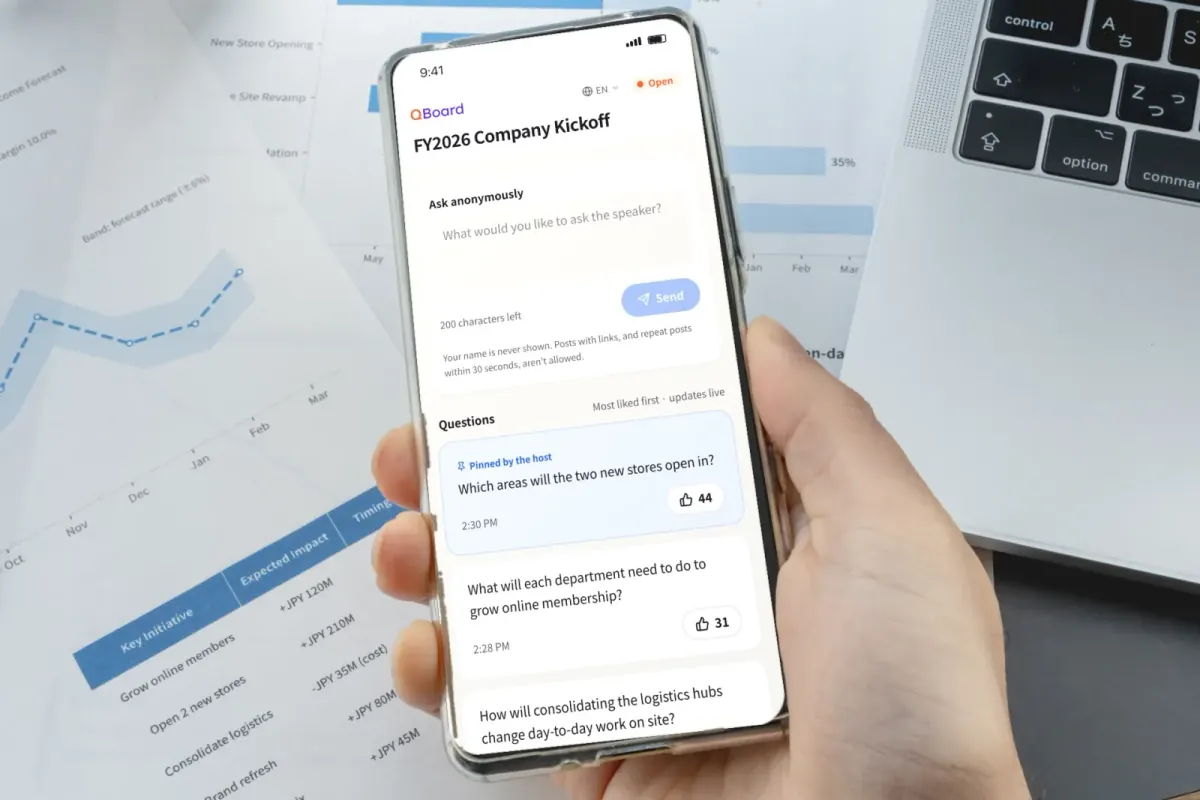
When people worry about what colleagues think, try a Q&A tool that lets them ask without their names. With QBoard, the organizer creates an event and shows the QR code on the meeting room screen. Participants then send questions from their phone's browser, with no app and no sign-up. Not even the organizer's screen shows who asked, so people can ask freely even at a session their manager runs.
When people like each other's questions, the list sorts itself by likes. The presenter can answer from the top down, starting with what most people want to know. If the presenter uses Google Slides, add the Chrome extension “QBoard for Google Slides”, and the live question list appears on the Q&A slide. The organizer can also pin questions to answer first and hide off-topic posts. The question list stays viewable afterwards, so the presenter can answer anything left over in the chat later.
There's no monthly fee: $19 per event, for up to 1,000 participants and 4 hours. You can use the free trial (up to 30 participants, 60 minutes) as many times as you like. Start with the organizer, the presenter and a few others, and test everything from sending a question to seeing it on the screen. If you run sessions every month, it's also worth comparing other Q&A tools that have a free plan.
How to Collect Questions at a Virtual Lunch and Learn

At an online session, the easiest option is your meeting tool's chat. People can post without interrupting the presenter, but their names show, so people who worry about colleagues may hold back. If you use the chat, ask people to start questions with “Q:” so they're easy to tell apart from comments and small talk.
Zoom meetings also have a Q&A feature, and you can allow anonymous questions in its settings. Questions sent anonymously show no name, even on the host's screen. Zoom's help pages list Zoom Workplace Business or higher as a requirement, though, so check your company's plan first. For setup steps, see how to use Zoom's Q&A feature.
A Q&A tool works whatever your meeting tool plan. Paste the link in the chat, and participants open it in a browser next to the meeting and send questions without their names.
Summary: Give People Time to Think of Questions First

When no one asks questions at your lunch and learn, announce at the start that you'll ask everyone for one question at the end, and set up note-taking time and a way to ask without giving a name. With time to think, and a way to ask without worrying about colleagues, questions come even from people who usually stay quiet.
At your next session, start with the announcement and the one-minute chat with a neighbor. Put the example questions on the last slide, and people will find it easier to shape their own. Pass on what worked to the next presenter, too, so questions don't dry up from one session to the next.
Show the QR code on the meeting room screen, and participants ask from their phones without giving their names. The most-liked questions come first, so the presenter just answers from the top.
Try it freeFree trial: up to 30 participants for 60 minutes, as many times as you like. Participants need no app and no sign-up